New Zealand & Australia · Local iSpring advice, implementation and supportinfo@alignedlearningsolutions.com
Browser-based AI course creation

Create, review and publish scrollable courses in your browser.

iSpring Cloud AI helps teams turn source material into polished learning content without starting from a blank page. Create in the browser, collaborate with reviewers and publish for delivery through iSpring LMS or another LMS.

✓ Browser-based authoring✓ AI-generated draft courses✓ Review and publish workflows
iSpring Cloud AI interface on a laptop showing browser-based AI course creation
Why teams use it

Three clear reasons to choose Cloud AI.

Use Cloud AI when speed, collaboration and browser-based course creation matter more than a desktop authoring workflow.

Browser-based AI course creation workspace

Create in the browser

Build scrollable courses online without installing a desktop authoring tool.

AI workflow turning source content into an eLearning draft

Use AI to speed the first draft

Start from a document, website or topic and let AI create the outline and content structure.

Collaborative review workspace for eLearning teams

Review together

Invite colleagues and stakeholders to comment, approve and refine content in one workspace.

AI course creation

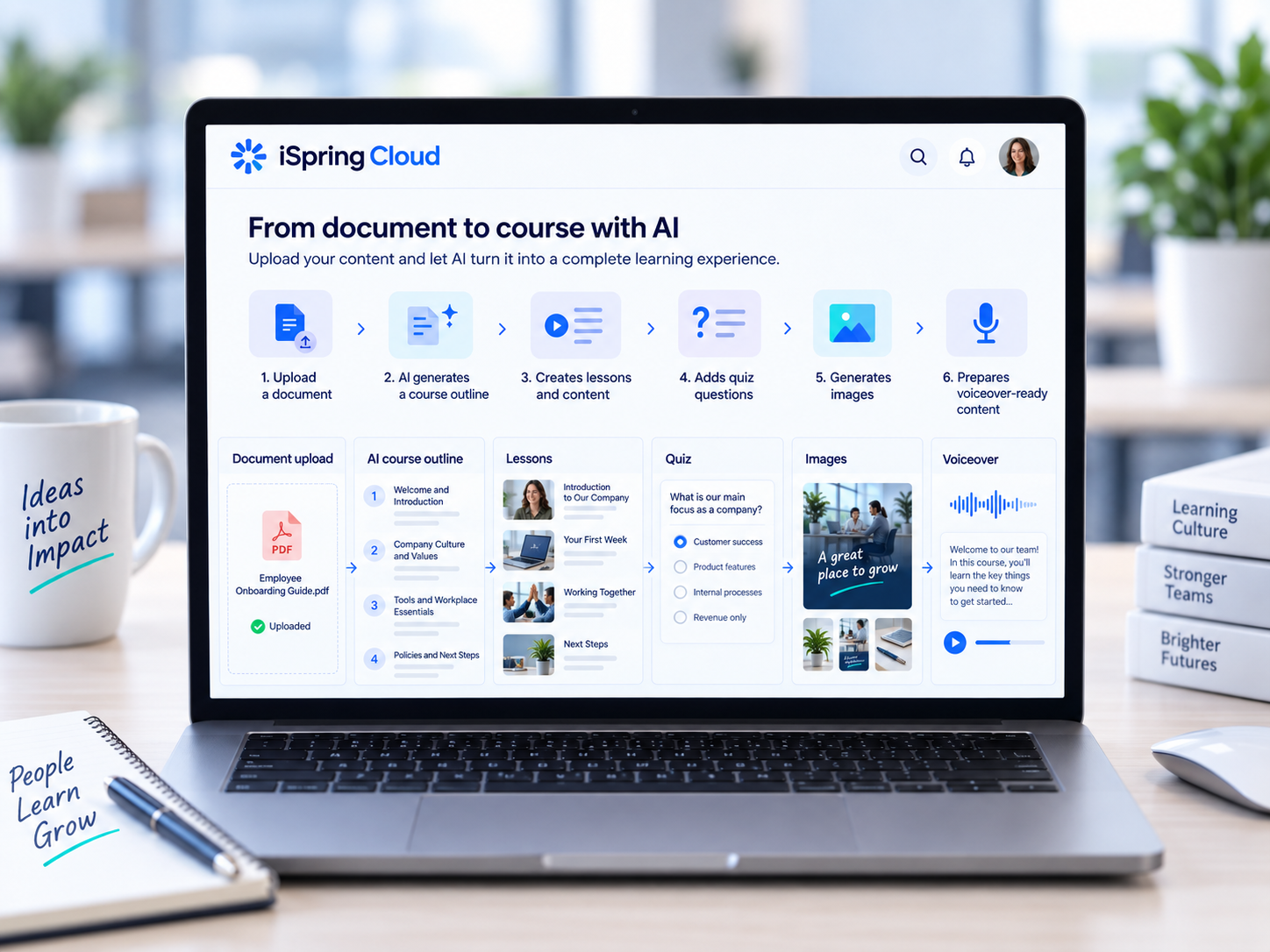
Go from document to course with a guided AI workflow.

Upload a PDF, Word document, presentation or text brief. Cloud AI can turn it into a structured learning flow with lessons, knowledge checks, supporting visuals and voice-ready content.

  • Start from a document, topic or URL
  • Generate the course outline automatically
  • Create lesson pages and knowledge checks
  • Generate images and prepare voiceover-ready content
iSpring Cloud AI workflow showing document upload, AI outline generation, lessons, quiz questions, images and voiceover
iSpring Cloud AI collaboration workspace showing comments, review and publishing options
Collaboration and publishing

Review faster, approve confidently and publish without version chaos.

Bring reviewers into the same workspace, keep feedback attached to the course itself and move from draft to approval without emailing files back and forth.

  • Shared review and comments in one place
  • Approval workflow with version visibility
  • Share by link for browser-based access
  • Publish to LMS or export SCORM and xAPI packages
Where it fits

Create in Cloud AI. Deliver and track in iSpring LMS.

Cloud AI handles rapid browser-based course creation. iSpring LMS handles enrolment, reminders, reporting and learner tracking.

Cloud AI→Publish→iSpring LMS
Ready to create in the browser?

Start with a free iSpring trial, then talk to ALS about the right setup for your organisation.